
Research documentation
Best Place to Buy GLP3: Kits, COAs and Calculations
Choose a complete research kit, calculate from the reported batch potency, and save the result with its matching COA.
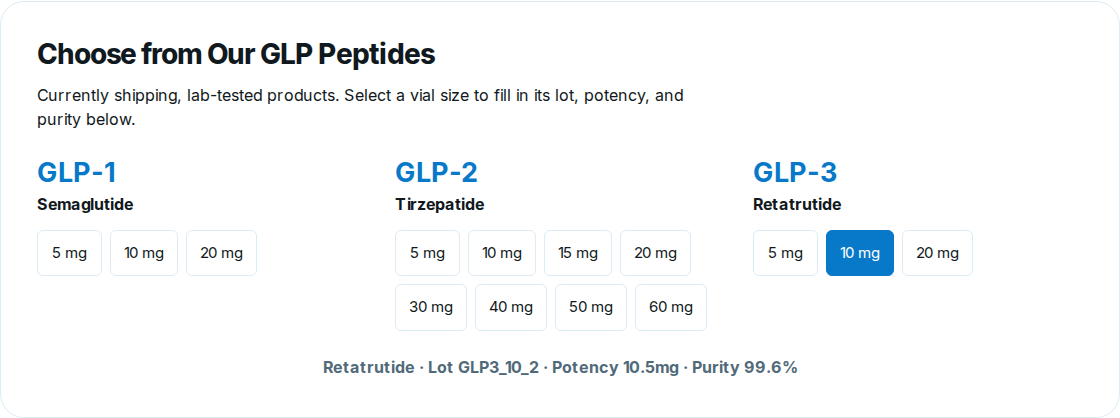
The best place to buy GLP3 for laboratory research should make three things easy: choosing the right kit, checking its batch report, and saving the numbers used for sample preparation. A low price means little if the listing leaves you guessing about what arrives or which report belongs to it.
At GLP-123, you can compare the available Retatrutide kits, check the public COA library, and use EZ Prep to calculate from the selected batch’s reported potency. The save option then helps keep your calculation and the matching Certificate of Analysis together.
This guide explains what to check before ordering and shows that workflow with real Retatrutide calculator screens. All products and examples discussed here are for laboratory research only, not human or veterinary use.
What does GLP3 mean here?
On this site, GLP3 and GLP-3RT refer to the Retatrutide research collection. The name helps you find the right product family. When you open a product or report, check the full material name and strength as well. A short label by itself is not enough to identify a batch.
Retatrutide is described by its developer as a triple receptor agonist, acting at GLP-1, GIP, and glucagon receptors. “GLP3” is not the name of a third GLP receptor. Our Retatrutide overview explains the research background.
There is also an important boundary: Lilly identifies Retatrutide as investigational and not approved for human use. A research kit and a COA do not change that status. This article concerns laboratory purchasing and record keeping, not treatment or personal dosing.
What to check before buying a GLP3 kit
Start with the exact item you plan to order. GLP-123 currently lists 5mg, 10mg, and 20mg GLP-3RT options. Those are catalog sizes, so use them to find the product, then check its details and the report for the lot you receive.
A useful listing should tell you what you are buying without making you piece it together from a photograph. Look for the peptide name, listed strength, kit contents, price, and a clear route to support. If something is missing, ask before you order.
Your buying checklist
- Correct material: Does the full product name match the research material you need?
- Correct size: Are you on the page for the intended 5mg, 10mg, or 20mg option?
- Clear contents: Does the kit list the peptide vial, water, and mixing accessory?
- Batch information: Can you find a report and confirm which lot it describes?
- Clear price: Are you comparing one kit with one kit, using the same quantity tier?
- Useful support: Can you ask about a named product or report before purchasing?
Keep the price comparison simple. A vial-only listing and a kit with preparation accessories are different offers. Compare what is included, then check shipping and the quantity you intend to buy. A bulk price applies only when the order meets that tier.
The available GLP3 kits are shown in strength order. Each purchase link opens the corresponding GLP-123.com product page, where you can review the current offer before checkout. Prices and stock can change, so confirm both on that final page.
Also check the shipping policy before ordering. Knowing the delivery options and how to report an order problem is part of comparing suppliers. It is easier to settle those questions before an order is placed than after a package arrives.
Why buying the full kit helps
A full kit brings the main supplied preparation items into one purchase. GLP-123’s research kits include the freeze-dried peptide, bacteriostatic water, and a mixing syringe for laboratory reconstitution. Check the selected product page for the exact contents and sizes.
The practical benefit is fewer separate items to track down. You can check the peptide and its supplied accessories together, rather than find that you ordered a vial but left out a basic preparation item. It also makes the order easier to review when it arrives.
Think of the kit as a starting set of materials. Your laboratory still provides its own approved procedure, protective equipment, clean work area, and any other equipment the method needs. “Full kit” does not mean that one box replaces all laboratory supplies or confirms that a method is suitable.

Water supplied in a kit is not an instruction to use the whole container. The amount used in the calculation must match the amount specified by your laboratory procedure. Keep the accessory container size separate from the volume actually used in a preparation.
The same care applies to the mixing syringe. It is supplied for laboratory preparation, not administration to people or animals. The calculator’s U-100 scale is a way to express volume on that specific scale, not a statement that every accessory has the same markings.
Before use, confirm that the actual measuring equipment is suitable for the volume your method requires. A mixing accessory and a device used for a small measured sample may serve different tasks. A complete purchase should make your preparation easier to plan, not encourage assumptions about equipment.
Our reconstitution and storage guide provides supporting information. Use it alongside the material-specific record and your laboratory’s procedure. If the contents of an order are unclear, contact support with the exact kit name.
Match the vial to its COA
A Certificate of Analysis, usually called a COA, reports results for an identified sample or batch. It is useful when you can connect that report to the material in front of you. A report for another strength or a previous lot is not a substitute.
Open the COA library and use the Retatrutide group. Compare the compound, lot identifier, report reference, and reported values with the supplied material. Check units too. A mass in milligrams and a purity percentage describe different things.
For the calculator example in this article, the selected record is GLP3_10_2. It belongs to the listed 10mg Retatrutide option and shows a reported potency of 10.5mg and purity of 99.6%. These are values from that selected record, not promises about all 10mg vials or future lots.
That distinction matters when reordering. The product name may stay the same while the batch changes. Check the new lot instead of opening an old saved calculation and assuming the inputs still apply. Keep the earlier record for the earlier preparation.
If the lot on your material does not match the available document, pause the calculation and ask for clarification. Send the product name and lot number to GLP-123 support. A precise question is much easier to answer than “Which report should I use?” without an identifier.
For a closer look at the document itself, read how to match a COA to a batch. The goal is straightforward: know which material the report describes before using its numbers.
Use reported potency, not just the number on the label
A listed strength helps you choose a catalog item. A reported potency supplies the mass used in EZ Prep’s calculation. When the applicable report gives a measured amount, using the nominal label value instead can change the calculated concentration and sample volume.
In our example, typing 10mg would use a different input from the selected record’s 10.5mg. The calculator can do either sum correctly, but only you can check which input belongs to your material. Correct arithmetic starts with the right record.
Keep three numbers separate:
- Listed strength: The size shown in the catalog, such as 10mg.
- Reported potency: The mass shown for the selected record, such as 10.5mg.
- Reported purity: The separate percentage shown on the COA, such as 99.6%.
Peptide content and purity are not interchangeable. Bachem’s peptide-content guidance explains that content calculations depend on the relevant analytical values for the lot. Follow the meaning and units of your own report rather than treating a purity percentage as a milligram amount.
EZ Prep uses the entered potency directly. It displays the selected record’s purity for reference, but it does not multiply the potency by that percentage. Do not assume that it performs an extra purity correction or determines how a laboratory should interpret a report.
That is especially important if a reported mass already includes an analytical adjustment. Applying another correction without understanding the method could count the same adjustment twice. If the report’s meaning is unclear, resolve that question with the laboratory or report issuer before using the value.
Batch review is a repeat step, not a one-time task. Bachem’s analytical FAQ notes that peptide content and impurity profiles can vary between batches. Keep your calculation connected to the record actually used, even when the product name is familiar.
How EZ Prep fills in the Retatrutide values
Open the EZ Prep calculator and choose a strength under GLP-3 Retatrutide. That selection loads the linked lot number, reported potency, purity, and associated COA. You do not need to copy each of those fields separately from the archive.
1. Choose the matching option
For this walkthrough, choose GLP-3 Retatrutide 10mg. Check that the calculator shows lot GLP3_10_2 and 10.5mg in the Lab Tested Potency field. Compare that lot with your own material before treating the selected record as applicable.
A strength button is a convenient way to load a record, but it cannot read the label on your vial. If your lot differs, use the lot lookup and check the result. If there is no match, do not borrow a neighboring lot’s values just to complete the fields.
2. Enter the procedure’s water volume and sample amount
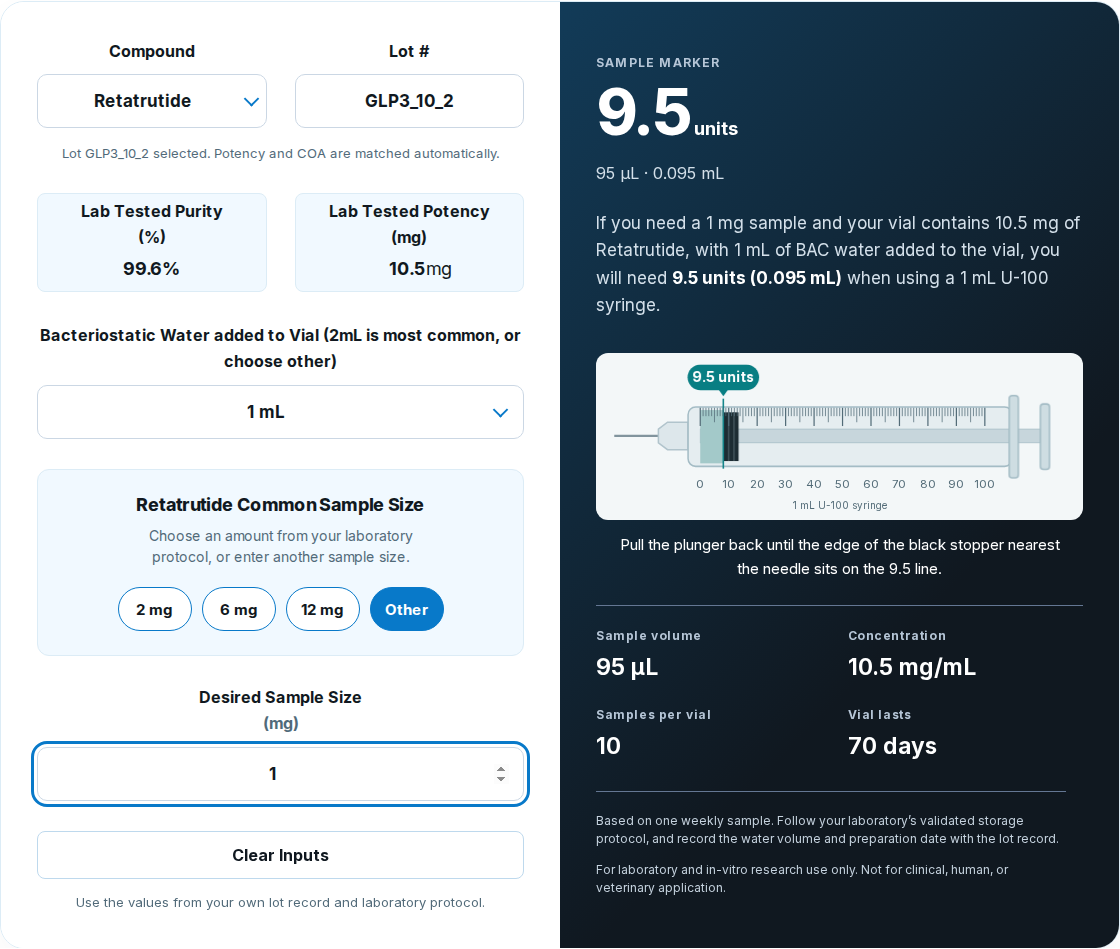
Next, select the water volume and enter the desired research sample mass from your laboratory procedure. The example shown here uses 1mL water and a 1mg sample solely to demonstrate the calculation. These are example inputs, not a recommended preparation or dosing plan.
The calculator uses the entered water volume as the volume in its concentration calculation. It does not measure the final solution volume, check solvent suitability, or decide the correct sample size. If your method requires other corrections, handle those within that method.
3. Read the calculated result
With 10.5mg and 1mL entered, the calculated concentration is 10.5mg/mL. A 1mg sample corresponds to about 0.095mL, displayed as 95 microliters and 9.5 units on a 1mL U-100 scale. The display rounds these values.
The basic relationship is sample volume = target sample mass ÷ concentration. EZ Prep shows the result as a number, a volume, and a visual marker. Seeing the same result in several forms can help a reviewer spot an entry error before a record is saved.
Units are scale-specific. On a U-100 scale, 100 units represents 1mL. Those units are not milligrams, and the same marker cannot be carried across different concentrations. Confirm the actual equipment and the precision needed for your laboratory work.
4. Review the inputs once more
Check the compound, lot, potency, water volume, and sample amount together. Automatic filling reduces repeated typing; it does not prove that the selected lot matches your material or that a preparation is suitable for an experiment.
The “Vial lasts” estimate also needs context. It assumes one weekly sample. It is not a stability study, expiry date, or promise about storage after preparation. Your laboratory’s validated storage limits remain separate from that arithmetic.
If you want more examples, the Retatrutide calculator walkthrough shows how changing inputs changes the output. Keep each saved example separate from an actual preparation record.
Save the calculation and COA together
A result is easier to review when its source stays beside it. A screenshot of “9.5 units” alone leaves out the lot, potency, water volume, and sample amount. It also leaves out the report that supplied the batch information.
EZ Prep’s button is labeled SAVE INSTRUCTIONS, with the note “Includes GLP-123 COA if selected.” This is the save-calculations-and-COA feature: when a GLP-123 record is selected, the printable output includes the sample plan and its associated certificate pages.

Pressing the button opens your browser’s print dialog. Choose Save as PDF, or the equivalent option on your device, to keep a local file. You can also print the record. The exact save controls depend on your browser and operating system.
The saved guide identifies the compound and lot and lists the entered potency, water volume, target sample, calculated concentration, and sample volume. The selected COA follows in the same print output. Review the pages before saving to make sure both the calculation and certificate are present.
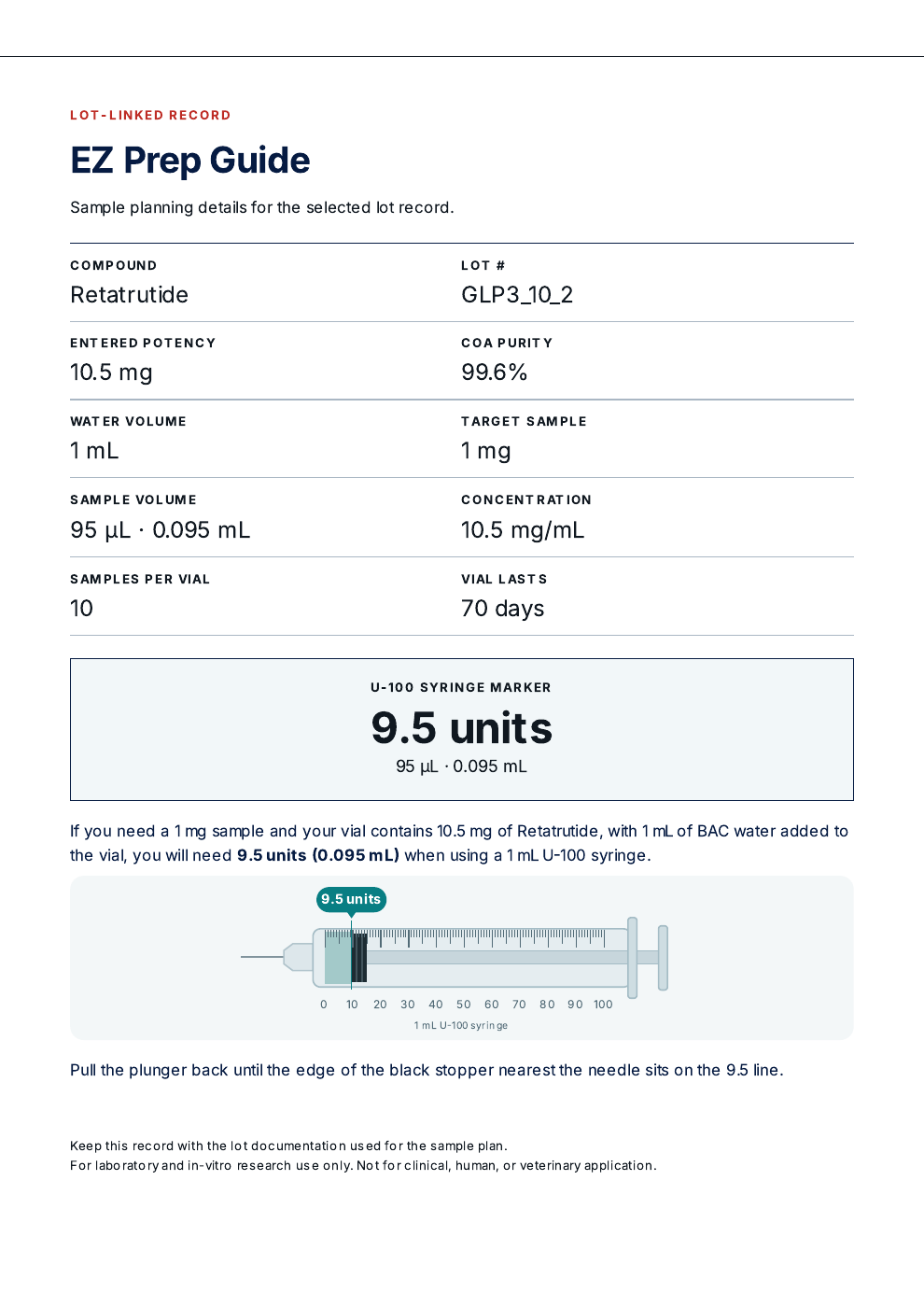
This keeps the calculation and its supporting document in one saved place. Another team member can see which report was used without looking through a separate folder or guessing from a filename. It also makes it easier to check a preparation later.
Use a filename that identifies the compound, lot, and preparation date. Add the file to the laboratory’s normal records alongside any required notes. The save feature creates a printable record; it does not create an online account, upload your file to a shared archive, or replace your laboratory’s record system.
If you enter custom values without selecting a GLP-123 COA, the calculator cannot attach a matching certificate. Save the calculation and file your own source report with it. A PDF is useful only when the underlying information is correct and complete.
Keep distinct preparations distinct. If the water volume or target sample changes, save a new record and identify what changed. Do not overwrite an earlier file if it documents work already completed. Clear filenames and a short note are often enough to prevent confusion.
Our article on batch-linked calculations explains why that connection matters. The benefit is practical: less copying, fewer loose documents, and a clearer trail from the material to the calculation.
A quick check when the kit arrives
Compare the delivery with the order before filing the paperwork. Confirm the listed strength, check the supplied accessories, and record the lot identifier on the material. If the contents differ from the listing or something is damaged, keep the order details and contact support.
Then find the applicable COA. Do not assume that the report you viewed while shopping must cover the delivered lot. Match it again, enter or select the correct record in EZ Prep, and review the populated potency before adding your procedure’s inputs.
Keep the preparation date and any storage notes required by your laboratory with the saved file. The calculator’s output is one part of that record. It does not observe how the material was stored, whether the preparation was performed correctly, or whether the method remained suitable.
For a repeat order, run the same short check. The strength may be unchanged while the lot and reported values differ. Reusing a familiar workflow is helpful; reusing unchecked numbers is not. Start each new batch with its own document match.
Why choose GLP-123 for GLP3 research kits?
For laboratories that want a kit, public batch records, and a calculator in one workflow, GLP-123 brings those pieces together. You can compare the available strengths, open the exact purchase page, review the COA, and carry the selected record into EZ Prep.
The advantage is convenience you can check. The kit groups the main supplied preparation items. The lot selection fills in the reported potency. The save button keeps the calculation and selected COA in one printable output. Each part supports the next without requiring you to retype everything.
There is no need to take a “best” label on trust. Use the checklist in this article: inspect the product, read the record, try the calculator, and review the saved pages. Choose the supplier whose materials and documentation meet your laboratory’s needs.
Browse the GLP3 Retatrutide kits to compare the current options, or open EZ Prep to see the batch-linked workflow. For help finding a product or report, contact our support team with the exact name and lot.
Frequently asked questions
What is the best place to buy GLP3 for research?+
Look for a supplier that identifies the exact material, lists the kit contents, provides accessible batch documentation, and offers clear product support. GLP-123 combines its Retatrutide kits with a public COA library and the EZ Prep calculator. Check the current product page and confirm that the report matches your delivered lot before using its values.
Does a GLP-123 kit include everything for reconstitution?+
The research kits include the peptide, bacteriostatic water, and a laboratory mixing syringe. Confirm the exact contents on the selected product page. Your laboratory still needs the equipment, protective supplies, work area, and approved procedure required for its method. The included accessories are for laboratory preparation only, not human or animal administration.
Why use the COA potency instead of the listed vial strength?+
The listed strength identifies the catalog option. The applicable COA gives the reported batch information used for the calculation. In the example here, the 10mg Retatrutide selection loads lot GLP3_10_2 and 10.5mg reported potency. That value applies to the selected record. Check your own lot rather than assuming every vial has the same result.
Does EZ Prep fill in potency automatically?+
Yes. Selecting a linked GLP-123 product record fills in its lot, reported potency, purity, and associated COA. You then enter the water volume and target research sample amount from your laboratory procedure. EZ Prep calculates the volume and U-100 marker from those inputs. Check the populated lot and values before saving, since the calculator cannot identify your physical vial.
Does the calculator apply another purity correction?+
No. EZ Prep uses the entered potency in milligrams directly and displays the selected report’s purity separately. It does not multiply the potency by that percentage. Confirm what the mass on your own report represents before making any further adjustment. The calculator does not interpret analytical methods or decide which corrections your laboratory procedure needs.
How do I save my calculations and COA in one place?+
Complete a valid calculation with a GLP-123 COA selected, then press SAVE INSTRUCTIONS. The browser’s print dialog opens with the calculation guide and associated COA pages. Choose Save as PDF if your device offers it, and review the saved pages. File the result in your laboratory records with the lot and preparation date. Without a selected COA, no matching certificate is attached.
Related posts

Research Documentation
Why Batch-Verified Math Matters in Peptide Research
Compare peptide calculators and see why saving batch-linked calculations with the associated COA makes research records easier to review.
Read article →
Research Documentation
Peptide Calculator for Retrutide
Use EZ Prep for Retatrutide: choose lot potency, water volume, and sample mass. Follow three examples and save a printable PDF with the selected COA.
Read article →
Research Documentation
Peptide Reconstitution: A Laboratory Research Guide
A research-focused guide to planning peptide reconstitution, preserving batch context, and keeping preparation observations useful for later review.
Read article →